
Sweet Dance
AU Dance StudioMusic
3.84.46K Reviews
- Version
- 23.3
- Installs
- 1.00M
- Age Rating
- Mature 17+
Screenshots

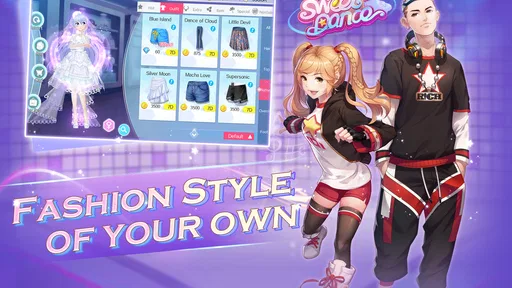


Our Review of Sweet Dance
 Analysis by Appyee
I approached Sweet Dance as a music game rather than as a serious dance-training tool, and that distinction matters from the first session. Its appeal is immediate: choose a track, follow the rhythm, and enjoy a colorful performance-focused experience on a phone. The game is free to download, belongs to AU Dance Studio, and is aimed at mature players aged 17 and over. I found it easy to understand once I got past the initial menus, but the overall experience depends heavily on how smoothly the game loads, how comfortable the controls feel on your device, and how patient you are when the rhythm does not seem to match your input.
The game has built a sizeable audience, with over a million installs and an average score of 3.8 from around fourteen thousand ratings. That combination tells me something useful: Sweet Dance is clearly attractive enough to bring many people in, but it is not a universally polished experience for every player. I would recommend trying it if you enjoy music-themed games with a social, fashion-conscious presentation. I would not choose it for quiet, offline play, a minimalist interface, or precise musical practice.
Getting past the first points of friction
I’ve learned that a smoother start comes from treating setup as part of the session, not as a race to reach the music. I’d choose a calm moment, keep the phone steady, and make one change at a time if anything feels off; that makes it easier to tell whether the snag is temporary or tied to the device. The same measured approach helps when a session breaks unexpectedly.
Why the opening session can feel less simple than expected
The first obstacle is not the dancing itself. It is understanding what the game wants from you before you can settle into a routine. A new player may expect an instant rhythm challenge, but a mobile game with a large visual presentation often needs time to prepare its content and guide you through its opening flow. I recommend starting on a stable connection, keeping other demanding apps closed, and allowing the opening sequence to finish instead of repeatedly tapping through screens.
If the game appears slow, freezes during a transition, or returns you to an earlier screen, I would first close it normally and reopen it once. Repeatedly launching it without giving the device a moment to clear the previous session can make troubleshooting harder. This is simple advice, but it saves time: change one thing at a time so you can tell whether the issue came from the connection, the device, or the game session itself.
Another common source of confusion is the difference between a visual problem and a gameplay problem. If characters, menus, or effects look delayed, that does not automatically mean the rhythm input is broken. If the music plays but taps feel late, the issue may be performance or timing rather than your ability to follow the beat. I found it more useful to test a short, uncomplicated session than to judge the entire game from a busy opening screen.
Checks I would make before blaming the controls
Before spending money on anything inside the game, I would make sure the device meets the basic software requirement. Sweet Dance supports Android from version 7.0 onward, while the current listed version is 23.3. Keeping the operating system and the game current is a sensible first step, especially if the title opens but behaves inconsistently after an update.
I would also check available storage, battery-saving restrictions, and whether the phone is running hot. These are general mobile checks, but they matter more in a rhythm game because a small delay can affect the feeling of an entire song. A phone that is handling several background tasks may still run the game, yet not deliver the steady response that the music format needs.
For a fair test, I suggest using the same device position each time, lowering distractions, and trying a short play session before changing settings. If the game works normally after a restart but becomes unreliable later, heat or background load is a more likely explanation than a permanent control fault. If it fails at the same point every time, note exactly where that happens; that detail is far more useful than simply saying that the game “does not work.”
How I would handle account and purchase decisions
Sweet Dance is free, but it includes optional purchases ranging from $0.99 to $99.99 per item. I would treat those purchases as a later decision, not part of setup. First, learn whether the basic rhythm loop suits you, whether the visual style holds your attention, and whether your device handles longer sessions comfortably. Paying early will not solve a loading problem, a timing issue, or an uncomfortable interface.
The mature rating is also worth taking seriously. I would not install it for a child simply because the core idea involves music and dancing. The age label is part of deciding whether the game belongs on a particular device, and it should be considered before creating a routine around it.
Recovering a session when something goes wrong
When a session goes wrong, I try to preserve what was working before changing anything: note the screen or moment where it faltered, then reopen the game and test a brief session under the same conditions. If the problem repeats only in one place, that is a useful clue; if it appears everywhere, I look at the phone and connection first. This keeps recovery practical without turning a small interruption into a full reset.
A practical restart sequence
When a session goes wrong, I use a short recovery sequence. I leave the current screen, close the game, check the connection, and reopen it without simultaneously launching other apps. If that does not help, I restart the phone and try again. I avoid immediately clearing everything or reinstalling because those steps can create new problems, especially if a player is unsure how the game handles local progress or sign-in details.
If only one song or one screen causes trouble, I would move to another available part of the game and see whether the rest behaves normally. That comparison helps separate a general device problem from a problem tied to a particular piece of content. It also prevents a player from abandoning the whole title after one bad attempt.
For rhythm play, I would repeat the same test with a consistent volume level and headphones only if the device handles them reliably. Changing audio equipment, connection, and gameplay style at the same time makes it impossible to identify the cause of a delay. My preferred approach is deliberately boring: one device, one connection, one short session, then one change.
When visual smoothness affects musical timing
Sweet Dance is designed to be visually expressive, and that can be part of its charm. It can also become a weakness on a less capable or busy phone. If animations appear to stutter, I would not assume that tapping harder or faster will fix the result. Rhythm games reward consistency, and a delayed frame can make a correct response feel wrong.
In that situation, I would reduce the number of things happening around the game: close background apps, let the phone cool down, and avoid playing while the device is under heavy load. If the experience improves after that, the limitation is probably the play environment rather than the song itself. This is one reason I prefer evaluating the game in several short sessions instead of making a final judgment after a long first sitting.
There is also a human factor. Bright effects, character movement, and a busy interface can make it harder to focus on the rhythm. I found that concentrating on the audio cue first, then using the visuals as confirmation, is more reliable than staring at every animation. Players who are easily distracted may enjoy the style less than players who want the screen to feel lively.
When the app is not the real cause
Some frustrations are better explained by the phone or the surroundings. A weak connection can interrupt a content-heavy session, while notification sounds and touch interruptions can make a perfectly functional game feel inconsistent. If the same device struggles with several demanding apps, Sweet Dance may simply be revealing an existing performance limit.
Touchscreen behavior can also vary with a thick protector, damp fingers, a damaged display, or an awkward grip. Before deciding that the game ignores inputs, I would test ordinary touch interactions elsewhere on the phone. If taps are unreliable outside the game too, reinstalling Sweet Dance is unlikely to be the best first move.
Audio delay deserves similar caution. Bluetooth headphones can introduce timing differences depending on the phone and headset combination. I would compare the built-in speaker with the headphones and keep the setup that feels more immediate. The result may not be a defect in the game; it may be the path the sound takes before reaching your ears.
Building a more dependable everyday routine
My most useful routine would be a short evening session after the phone has cooled down, with notifications silenced and the connection already tested. I would play a few songs, stop before the device becomes hot, and avoid making purchases until I knew I would return regularly. This makes the game easier to evaluate and reduces the chance that fatigue or technical noise will shape the opinion.
For someone with only a few minutes during a commute, the game may be less dependable if the connection changes or the environment is noisy. A quiet room is better when you want to focus on timing. For a casual break with friends, the visual presentation and music theme may be more important than perfect precision, so small delays may matter less.
I would also keep expectations realistic. Sweet Dance can encourage attention to rhythm and give music fans a playful way to spend time, but I would not use it as a replacement for dance lessons, structured exercise, or a dedicated rhythm-training tool. Its strength is entertainment wrapped in a dance setting, not formal instruction.
How it compares with familiar alternatives
Compared with a traditional music player, Sweet Dance asks you to interact with the song instead of simply listening. That makes it more engaging, but also more demanding: the screen, touch response, and device performance all become part of the experience. If you want background music while working, a player is the better choice.
Compared with a dedicated dance-learning app, this game is more approachable and playful. It is less suitable if your goal is to improve technique, posture, footwork, or choreography in a structured way. A dedicated learning product would be the stronger option for measurable practice, while Sweet Dance is better for players who want a game loop with music at its center.
Compared with a minimalist rhythm game, Sweet Dance places more emphasis on its fashionable presentation and broader entertainment feel. That can make it more inviting for players who enjoy customizing or inhabiting a music-themed world, but less appealing to someone who wants nothing between the beat and the input. The trade-off is clear: more personality can also mean more visual and setup friction.
Who will enjoy it, and who should skip it
I think the best match is a mature player who likes rhythm challenges, animated performers, and a colorful music-game atmosphere. It is also a reasonable choice for someone who wants a free starting point and is comfortable deciding later whether optional purchases are worthwhile. The large install base suggests that the concept has broad appeal, even though the average score shows that the execution will not satisfy everyone.
I would skip it if you need guaranteed offline simplicity, dislike busy presentation, or become frustrated by even small timing inconsistencies. I would also choose something else if your main goal is learning real dance technique or listening to music without interaction. The game is not wrong for those needs; it is simply aimed at a different kind of enjoyment.
One subtle trade-off is commitment. Because the game is free to start, it is easy to install casually, but the combination of visual content, optional purchases, and repeated rhythm sessions can encourage a longer relationship with it. I recommend deciding in advance whether you are looking for a ten-minute distraction or a regular hobby. That decision will help you judge the game fairly rather than expecting it to serve every purpose.
My practical verdict after using it
Sweet Dance works best when I treat it as a stylish, interactive music game and prepare the phone for a stable session. The developer, AU Dance Studio, has created something more distinctive than a plain tap-to-the-beat utility, and the free entry point makes it easy to test. Its current version, 23.3, supports a broad range of Android devices beginning with version 7.0, which helps lower the barrier to trying it.
Still, the 3.8 average is a fair warning not to expect flawless polish. Setup friction, device performance, audio timing, and visual busyness can all affect how enjoyable the game feels. My advice is to test it without spending money, use a consistent device and audio setup, and give yourself several short sessions before deciding. If the rhythm loop and presentation click with you, it can be a fun way to make music interactive. If you want precision, quiet simplicity, or formal dance instruction, another category of app will serve you better.
My bottom line: try it for the playful music experience, but judge it by stability and comfort on your own phone rather than by the concept alone. That is the difference between a pleasant casual game and a frustrating one, and it is why I would recommend Sweet Dance selectively rather than universally.
Verdict
Strengths of Sweet Dance
- Large selection of songs, outfits, and dance styles to unlock.
- Social rooms make it easy to meet and interact with other players.
- Regular events provide extra rewards and limited-time content.
- Avatar customization offers plenty of ways to create a unique look.
- Rhythm gameplay is simple to learn and suitable for casual players.
Limitations of Sweet Dance
- Progress can feel slow without spending premium currency.
- The game requires a stable internet connection for most features.
- Frequent updates may take up considerable storage space.
- Some competitive features can favor players who make purchases.
- Chat and social interactions may not be ideal for younger users.
Similar Picks in This Category
View All
Tiles Hop Music & Ball Game
AMANOTES PTE. LTD.4.3

Magic Tiles 3™ - Piano Game
AMANOTES PTE. LTD.4.6

Real Piano
Bilkon3.7

Piano Game: Classic Music Song
Dream Tiles Piano Game Studio4.0

Smash Colors: Music Ball Rush
BADSNOWBALL HONGKONG LIMITED4.2

Piano Music Go-EDM Piano Games
Joy Journey Music Games4.5
Frequently Asked Questions
What is Sweet Dance, and what can I do in the game?
Sweet Dance is a colorful online rhythm and social game where you follow music tracks, tap or swipe in time with the beat, customize your character, and interact with other players. Besides dance challenges, it includes fashion items, virtual rooms, social activities, pets or companions, and multiplayer features. It is designed for players who enjoy music, avatars, and casual online communities.
Is Sweet Dance free to download and play?
Sweet Dance can generally be downloaded and played for free, but it includes optional in-app purchases. These purchases may provide virtual currency, costumes, accessories, dance effects, or other convenience items. Progress is not necessarily dependent on spending money, although some limited-time content may be easier to obtain through purchases. Check the store listing and your device’s payment settings before downloading.
Does Sweet Dance require an internet connection?
Yes, Sweet Dance is primarily an online game and normally requires a stable internet connection. Online access is needed to sign in, download game resources, participate in rhythm matches, communicate with other players, and synchronize your progress. Because of this, it may not be suitable for offline play. Using mobile data can also consume a noticeable amount, especially when downloading updates or additional content.
Is Sweet Dance suitable for children and teenagers?
Sweet Dance may appeal to younger players because of its bright graphics, music, character customization, and simple controls. However, it also contains online social features, chat, user interactions, and optional purchases. Parents should review the game’s age rating, privacy policy, and communication tools, then enable device-level parental controls where appropriate. Children should avoid sharing personal information with other players.
What devices and permissions does Sweet Dance need?
Sweet Dance is available for supported Android and iOS devices, but the exact compatibility requirements can change as the game receives updates. It may require considerable storage space because additional music, graphics, and event files can be downloaded after installation. A modern device, updated operating system, and reliable connection will provide a smoother experience. Review the official store page for current requirements and permissions.
Play our best games!


